Translate a TikTok video · AI dubbing
TikTok video translator for the videos you filmed yourself.
Translate a TikTok video you made into English, Spanish or another of 28 languages. Upload the original file from your phone or editor. DubSync translates the speech, gives each speaker a voice created from their own, keeps the music and background sound in the file and returns an MP4 with the same vertical picture. You post it yourself, on your account or on a second one for that language.
Upload my videoPro: 7 days free for eligible new subscribers, with 60 minutes. Card required. Then $29.90/month; cancel before the trial ends to pay nothing. Trial minutes expire after 7 days.
Upload an MP4, MOV or M4V. You see the minutes and the cost before anything starts.
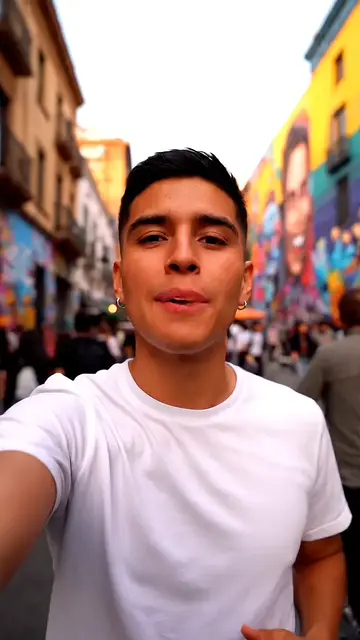
What is said: Mismo video, otro idioma. Así llego a personas que no hablan español sin grabar de nuevo.
What is said: Same video, different language. This way I reach people who don't speak Spanish without recording again.
What is said: Mesmo vídeo, outro idioma. Assim chego a pessoas que não falam espanhol sem gravar de novo.
Demo clip: an AI-generated scene with a fictional character. Dubbed with VDub v2, the model DubSync runs; lip-synced tracks use VSync v2.
Lip-sync shown in these examples is an optional paid add-on, separate from the dubbing trial.
- Works from your video file, not a link
- A vertical video stays vertical
- 28 target languages
- MP4 out, no visible watermark
- Pay per input minute
Start here
What TikTok already does, and where a dub comes in.
People who search for a TikTok translator want different things, and TikTok covers some of them inside the app.
| In TikTok's own tools | DubSync | |
|---|---|---|
| Following someone else's video | Captions you switch on from the Share menu, when the post has them.1 In 2022 TikTok announced translations for captions, descriptions and text stickers, on select videos2 | Not what it is for: no link import, and only your own videos |
| Captions on your own video | Generated automatically for videos you upload, in the language you select before posting3 | No caption or subtitle files. A dub changes the audio only |
| Your video, spoken in another language | Translate and dub in Symphony Creative Studio, an ad tool for logged-in TikTok for Business marketers. Its videos are labeled AI-generated automatically4 | A dubbed MP4 from your original file, with a voice created from each speaker. You post it and switch on TikTok's AI label yourself5 |
Into English
Translate a TikTok video to English.
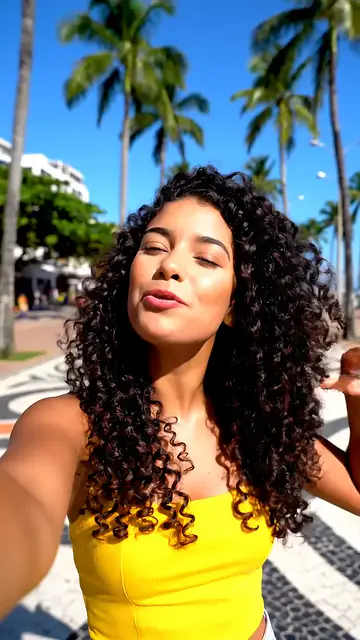
A selfie clip in Portuguese, heard in English
For an English version of a video you recorded in Spanish or Portuguese, upload the file and choose English. The spoken language is detected for you. The demo is an AI-generated selfie scene with a fictional character speaking Portuguese. Switch the language under it and listen for what stays: the background sound and a voice similar to the speaker's.
The demo's English track is also lip-synced, because a mouth out of step with the sound is easy to notice in a selfie video. Lip-sync is an optional paid add-on for a finished dub of up to 5 minutes, priced per minute for the whole video. You see the quote before it starts, and it works best with a clearly visible face.
The other direction works too: an English video dubbed into Spanish, Portuguese, Japanese or any other target language.
What is said: Esse short eu gravei em português. A versão em inglês saiu do mesmo arquivo e eu não precisei gravar de novo.
What is said: I recorded these shorts in Portuguese. The English version came from the same file, and I didn't need to record it again.
What is said: Este corto lo grabé en portugués. La versión en inglés salió del mismo archivo y no tuve que grabar de nuevo.
Demo clip: an AI-generated scene with a fictional character. Dubbed with VDub v2, the model DubSync runs; lip-synced tracks use VSync v2.
Lip-sync shown in these examples is an optional paid add-on, separate from the dubbing trial.
The source
Start from the original file, not from the TikTok link.
DubSync takes a video file (MP4, MOV or M4V), not a TikTok link, and a screen recording puts the app's buttons in the picture. The clean file is usually in one of three places.
Your camera roll
If you filmed with the phone's camera and edited later, the untouched clip is usually still in your gallery, without stickers, captions or added sounds. It is the best source for a dub.
Your editor's export
Export the video again as MP4 or MOV, without burned-in captions if you can. Text in the picture stays in the old language after a dub.
A copy saved from TikTok
TikTok recommends saving a video to your device before you post: on the Post screen, open More options and turn on Save to device. For a video of yours that is already up, tap Share, then Save video.7 If that copy carries a logo or text, it stays in the picture after the dub.
Drafts are not a backup: TikTok says they may be removed when the app is reinstalled or the account moves to another device.8
From your phone to a dubbed TikTok
Three steps in DubSync, and one in TikTok.
Upload the file and choose the language
The spoken language is detected automatically. You choose one of 28 target languages; a second language is a second project. A file can be up to 150 minutes and 1 GB.
See the cost, then confirm
You pay for the length of the original video, per language. The dub starts only after you confirm the cost, your rights to the video and the consent of everyone who speaks in it.
Download it and listen
A vertical video comes back as a vertical MP4, with no visible watermark. Each voice should sound similar to the speaker, not identical. There is no script editing, so check names, numbers and your call to action before you post.
Post it yourself
DubSync doesn't publish to TikTok or to any other platform. Upload the MP4 as a new post: tap the Add post button in the app and choose Upload, or click Upload at the top of TikTok in a web browser.9 In the app, under More options on the post screen, set Select video language to the language of the dub, so the automatic captions match what viewers hear.3 Write the description and hashtags in that language too.
TikTok's rule
Label a dubbed TikTok as AI-generated.
TikTok requires creators to label AI-generated content that contains realistic images, audio or video, and its examples include a video of a real person speaking whose voice or words were changed by AI.5 Its Community Guidelines ask for disclosure when AI-generated audio mimics a real person's voice.10 Neither page names dubbing. We read a dub as covered: the translated speech is generated in a voice created from yours.
- TikTok says the setting does not affect how a video is distributed, as long as the video follows its Community Guidelines.5
- A video that needs the label and lacks it may be removed, restricted or labeled by TikTok.10
- TikTok may add the label itself when it identifies AI content, for example from Content Credentials attached to a file, and that label can't be removed.5
- YouTube draws the line elsewhere: its examples exempt cloning your own voice for a dub.11 If the same file goes to TikTok and to YouTube Shorts, follow each platform's rule.
Posting
The same account, or a separate one for the language?
DubSync returns a video file, so on TikTok the dub goes up as a post of its own. TikTok allows more than one account per person, as long as they aren't used to deceive people or break its rules.10
The same account
- One audience
- Two languages in one feed
The least work. Followers may be shown the same video twice, once in a language most of them don't speak. It suits a mixed audience or a first test of another language.
A separate account for the language
- Its own followers
- Starts from zero
The name, bio, descriptions and comments are all in one language. Say in the bio that it is your account for that language, and link the two.
TikTok keeps reused material that adds nothing new out of the For You feed; its example is a clip showing someone else's watermark or logo.10 We found no published TikTok rule on one picture posted twice with two voice tracks. Localize the rest of the post as well: the description, the cover and any on-screen text.
Creator Rewards Program
A new language doesn't change who TikTok pays.
Posting in English doesn't open TikTok's Creator Rewards Program to an account in a country where the program isn't offered. Eligibility follows the account: a Personal Account in good standing that meets these numbers.1314
- Followers
- 10,000
- at least
- Video views
- 100,000
- in the last 30 days
- Video length
- 1 min
- or longer, for a video to count
- Minimum age
- 18
- 19 in South Korea
- You must be based in a country where the program runs, with an account registered there. TikTok's Creator Academy page, last updated in September 2026, lists the United States, the United Kingdom, Germany, Japan, South Korea, France, Mexico and Brazil.14
- TikTok sets an account's country or region at sign-up, from location information such as your SIM card's region or your IP address. To change it later, you may need to have been in the new country and active on TikTok there.15
- Inside the program, only views from those countries count as qualified, and Duets, Stitches and sponsored videos don't collect rewards.14 A rewarded video must be original content you filmed, designed and produced yourself, uploaded after you joined.13 We found no TikTok statement on how it reviews a dubbed copy of an earlier post, so don't count on rewards from one.
How rewards are calculated, and other ways to earn there: How much does TikTok pay.
Before you upload
Which TikToks to dub, and which to leave alone.
Works well
- Talking to the camera: tips, stories, reviews, explainers.
- Voice-over on footage: recipes, travel, product demos.
- Skits and interviews where people speak one at a time.
- Speech recorded close to the phone or a clip-on microphone.
Take care
- A trending sound or a song with no speech of your own: there is nothing to dub.
- Singing, rap and lip-sync performances: speech dubbing isn't made for music.
- Duets and Stitches: another creator's video and voice are in the file, and you need their permission.
- Slang and wordplay: ask a native speaker to check the result.
TikTok's rules point the same way: post only content you created or have the right to share, and no AI content that uses the likeness of a private person without consent. Likeness includes the voice.10 A dubbed copy of someone else's TikTok is still their TikTok.
Questions
Questions before you start
Can I paste a TikTok link to translate a video?
No. DubSync works from a video file: MP4, MOV or M4V. Use the clip from your camera roll, the export from your editor or a copy of your own video saved from TikTok. A screen recording is a poor source: the app's buttons end up in the picture.
Can I translate someone else's TikTok video?
To follow it, you don't need DubSync. When the post has captions, you can switch them on from the Share menu,1 and TikTok announced translations for captions, descriptions and text stickers in 2022, on select videos.2 To dub and repost it, you need the owner's permission and the consent of everyone who speaks in it. TikTok tells creators to post only content they created or have the right to share.10
Do I have to label a dubbed TikTok as AI-generated?
If I post in English, can I join the Creator Rewards Program from any country?
No. You have to be based in one of the countries where the program runs, with an account registered there, and meet its follower, view and age requirements.14 The language of your videos doesn't change that.
Does the dub translate my captions, stickers and on-screen text?
No. DubSync changes the spoken audio only and makes no subtitle or caption files. Text in the picture stays as it was. TikTok generates captions for videos you upload, in the language you select before posting,3 so set that to the language of the dub.
What happens to the sound or music in my TikTok?
Music and background sound in your file are kept under the new voice. A sound you added inside TikTok is not in the file from your camera roll or editor, so add it again when you post. Songs are a poor fit: speech dubbing isn't made for singing.
Is there a free plan, and what does a TikTok dub cost?
There is no free plan. You pay per input minute, which is the length of your original video, for each target language, and you see the cost before the dub starts. Current plans, and a trial when one is offered, are on the pricing page.
Plans from $4.90/month. You see the minutes and the cost before anything starts. See pricing
Sources
- TikTok Support. Accessibility for watching videos. Accessed Oct 5, 2026.
- TikTok Newsroom. Discover a world of entertaining content with new accessibility and translation tools. Published Jul 21, 2022; accessed Oct 5, 2026.
- TikTok Support. Accessibility for your videos. Accessed Oct 5, 2026.
- TikTok for Business Blog. Meet TikTok Symphony, our new Creative AI suite. Published Jun 22, 2026; accessed Oct 5, 2026.
- TikTok Support. About AI-generated content. Accessed Oct 5, 2026.
- TikTok Shop Academy (US). Lipsync Dubbing. Accessed Oct 5, 2026.
- TikTok Support. Download content. Accessed Oct 5, 2026.
- TikTok Support. Editing, posting, and deleting. Accessed Oct 5, 2026.
- TikTok Support. Making a post. Accessed Oct 5, 2026.
- TikTok Community Guidelines. Integrity and Authenticity. Published Aug 25, 2026; accessed Oct 5, 2026.
- YouTube Help. Disclosing use of GenAI content. Accessed Oct 5, 2026.
- TikTok Support. How TikTok recommends content. Accessed Oct 5, 2026.
- TikTok Support. Creator Rewards Program. Accessed Oct 5, 2026.
- TikTok Creator Academy. Creator Rewards Program. Accessed Oct 5, 2026.
- TikTok Support. Account region. Accessed Oct 5, 2026.
Keep exploring
Related pages
 ProductInstagram Reels translatorDub your own Reels from the original file, and see when Meta's free translation is enough.
 EarningHow much TikTok paysNo official TikTok pay rate: Creator Rewards rules, the eight countries, payouts and other ways to earn.
 ProductAI lip sync for dubsMatch mouth movement to a finished dub: when it helps, when to skip it, limits and per-minute pricing.
 Use caseVideo ad localizationDub a proven ad or UGC clip for a new market, and see what a dub leaves for you to localize.
- EarningYouTube Shorts monetizationRequirements, how the Shorts ad pool is split by country, pay per 1,000 views and what changes in 2027.
 ProductAI video translatorTranslate your video into 28 languages with a voice created from each speaker.
Start with one TikTok
You filmed it once. Let people who don't speak your language hear it.
Upload the file, see the minutes and the cost, then decide.
Upload my videoOnly upload videos you have the rights to, with every speaker's permission.